

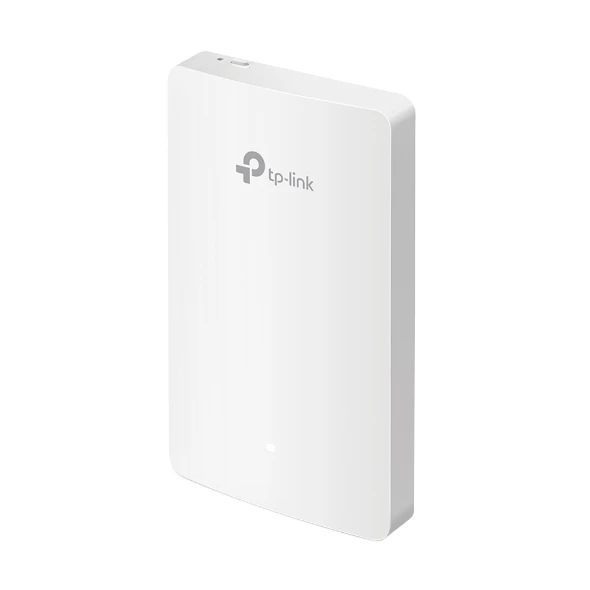
TP-Link EAP235-Wall AC1200 Wall Plate Access Point
₨22999.00
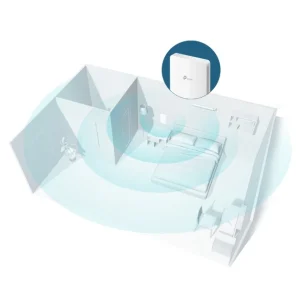
- AC1200 dual-band WiFi (300 Mbps on 2.4 GHz + 867 Mbps on 5 GHz) for one room, without a separate router in the room.
- Wall-plate design that fits a standard 86 mm junction box and sits flush on the wall.
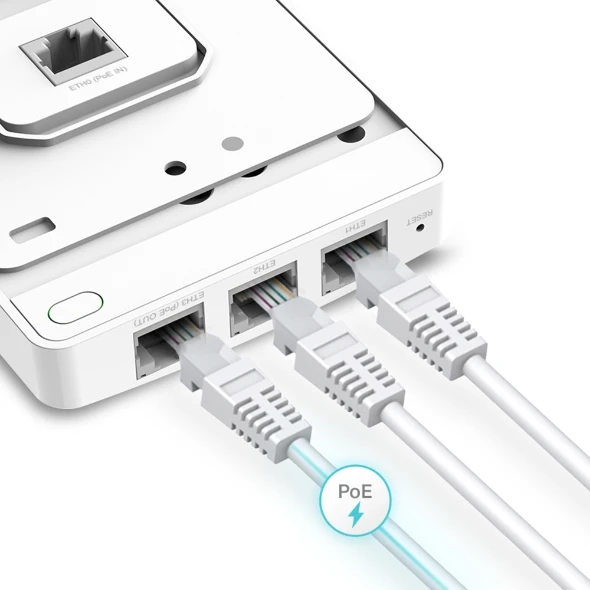
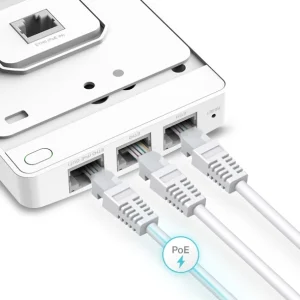
- Four Gigabit Ethernet ports — one uplink and three for a TV, VoIP phone, or desktop.
- Works with Omada SDN for central management, and also works on its own without a controller.
- Description
- Reviews (0)
Description
Overview
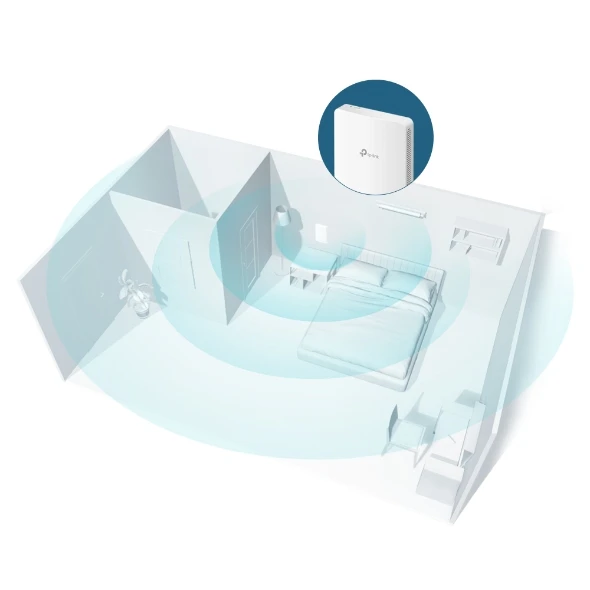
The TP-Link EAP235-Wall is a wall-plate access point, not a router and not a ceiling unit. It is for places where each room needs its own WiFi: a hotel room, guest house, serviced apartment, hostel dorm, or office cabin. You fit it where a network wall socket would go, and that room gets WiFi plus wired ports.
It runs on WiFi 5, rated AC1200 — 300 Mbps on 2.4 GHz and 867 Mbps on 5 GHz. In one room that covers normal use: video calls, streaming, and browsing, as long as the wired feed is sound. The plate has four Gigabit ports: one uplink to your switch, and three for a TV, a VoIP phone, and a laptop. One downlink port can pass PoE to a phone, up to 13 W, when the unit itself is fed by 802.3at PoE+. Power comes over the same cable, through 802.3af/at PoE. No adapter is in the box. It draws 9.8 W. It is part of TP-Link’s Omada range, so it can be managed centrally, or work on its own for one or two units. It is not a home router, and not for a whole floor.
Key Benefits
One network per room. A guest in Room 101 does not share the same open network with every other room. With 16 SSIDs — eight per band — you can give each room its own network, or separate networks for guests, staff, and devices. Put an SSID on its own VLAN, and traffic stays separate.
Simpler wiring. A room needs one Ethernet cable to the wall, not a cable plus a power socket plus a separate access point on a table. The plate is 143 x 86 x 20 mm, white, and fits 86 mm, EU, and US junction boxes.
Useful wired ports. In a hotel room the TV works better on a cable, a VoIP phone needs a cable and often PoE, and a work desk is more reliable wired. Three downlink ports cover those three uses. With an Omada controller you can manage all the plates from one dashboard. Load balance, band steering, and rate limits help when rooms stream and call at the same time.
Features and Advantages
The wireless side is WiFi 5, 802.11ac Wave 2, dual-band, with 2×2 MU-MIMO. The two internal antennas are rated at 4 dBi on both bands. MU-MIMO serves more than one device at once, beamforming focuses the signal towards a connected device, and band steering nudges a capable device towards 5 GHz when the signal is strong enough. Rate limits, QoS (WMM), auto channel, transmit power control, and wireless and reboot schedules let you control how the network behaves in each room.
On security, it supports a captive portal, access control and MAC filtering, client isolation, SSID-to-VLAN mapping, LAN port VLAN, rogue AP detection, 802.1X, and WEP, WPA/WPA2-PSK, and WPA/WPA2-Enterprise. It does not support WPA3 — if your policy requires WPA3, this is not the model for you. Management is through Omada: the Cloud-Based Controller, a hardware controller such as the OC200 or OC300, the Software Controller, the Omada App, and Cloud Access, with Zero-Touch Provisioning on the Cloud-Based Controller. Larger installs also get SNMP, SSH, HTTP/HTTPS, L3 management, and multi-site management. It carries CE, FCC, and RoHS markings. If you need open-plan coverage from above, a ceiling unit such as the TP-Link EAP723 BE5000 or the TP-Link EAP225 AC1350 makes more sense. For a smaller room at a lower price, the TP-Link EAP225-Wall Access Point AC1200 is the closer comparison.
Ideal Users
Best for hotels, guest houses, and serviced apartments. One plate per room gives each guest a private network, a wired port for the TV, and a port for a VoIP phone. Staff can run a separate SSID on a different VLAN, without giving guests access to it. It also suits offices and co-working cabins, schools, hostels, and dorms — each room can have its own SSID, with rate limits. It suits Omada SDN users. It is not the right choice for one device to cover a whole house or floor, for outdoor coverage, or for WiFi 6.
Technical Specifications
| Specification | Details |
|---|---|
| Model | TP-Link EAP235-Wall |
| Wi-Fi standard | 802.11ac Wave 2 (WiFi 5), dual-band |
| Wi-Fi speed | AC1200 — 300 Mbps on 2.4 GHz + 867 Mbps on 5 GHz (1,167 Mbps total) |
| Coverage | 25 m² (300 ft²) |
| MU-MIMO | 2×2 MU-MIMO |
| Antennas | 2 dual-band internal, 4 dBi on 2.4 GHz and 4 dBi on 5 GHz |
| Ethernet ports | 4x Gigabit 10/100/1000 Mbps (1 uplink + 3 downlink) |
| PoE in | 802.3af/at PoE |
| PoE out | One downlink port, up to 13 W, only with 802.3at PoE+ input |
| Power consumption | 9.8 W; 24.4 W with PoE out |
| Mounting | Wall-plate, fits 86 mm, EU, and US junction boxes |
| Dimensions | 143 x 86 x 20 mm |
| Colour | White |
| SSIDs | 16 in total (8 per band) |
| Wireless features | MU-MIMO, beamforming, band steering, load balance, rate limit, QoS (WMM), auto channel, transmit power control, reboot schedule, wireless schedule |
| Security | Captive portal, access control, MAC filtering, client isolation, SSID-to-VLAN, LAN port VLAN, rogue AP detection, 802.1X, WEP, WPA/WPA2-PSK, WPA/WPA2-Enterprise (no WPA3) |
| Management | Omada Cloud-Based Controller, Hardware Controller (OC200/OC300), Software Controller, Omada App, Cloud Access, Zero-Touch Provisioning (needs Cloud-Based Controller), SNMP, SSH, HTTP/HTTPS, L3 management, multi-site management |
| Other hardware | Physical lock, reset button |
| Operating temperature | 0 to 40 degrees Celsius |
| Operating humidity | 10 to 90 percent, non-condensing |
| Certifications | CE, FCC, RoHS |
| In the box | EAP235-Wall access point, installation guide, mounting screws |
FAQs
Does it need a separate power adapter?
No adapter is included, and in most installs you will not need one. It is powered by PoE over its uplink cable, using 802.3af/at. If your switch does not provide PoE, you will need a PoE injector or PoE switch.
Can it power a VoIP phone?
Yes, in one case. One downlink port can pass PoE through to a phone, up to 13 W, but only when the access point itself is fed by 802.3at PoE+. With a standard 802.3af feed, there is no PoE out.
Does it work without an Omada controller?
Yes. You can set it up and run it on its own, which is fine for one or two rooms. The controller makes it practical at scale: central settings and one dashboard for every room.
Is this a ceiling access point?
No. It is a wall-plate access point. It mounts on a wall, in a junction box, at socket height. It is not designed to mount on a ceiling. If you need coverage for an open area from above, look at a ceiling model instead.
How many devices can connect to it?
TP-Link lists 200+ concurrent clients for this model. In practice the number you get depends on what those devices are doing — video calls and streaming use far more than browsing — so plan around your heaviest room, not the headline number.
Why Buy From NexGenShop.pk?
NexGenShop.pk lists the model, the price, and the key facts as they are, so you can check the EAP235-Wall against your switch, your PoE budget, and your room layout before you buy. The price here is Rs 22,999. If you need help choosing, or working out whether your switch provides 802.3at PoE+, ask before you order. Follow NexGenShop.pk on Facebook and Instagram for product updates.
Final Conclusion
The EAP235-Wall does one job in a tidy way: a private AC1200 network and three wired Gigabit ports for one room, in a white wall plate. For a hotel, guest house, serviced apartment, office cabin, or clinic room — especially where you already use Omada — it is a sensible, practical choice at Rs 22,999. Check your PoE supply, count the rooms, and order one per room.




Reviews
There are no reviews yet.