

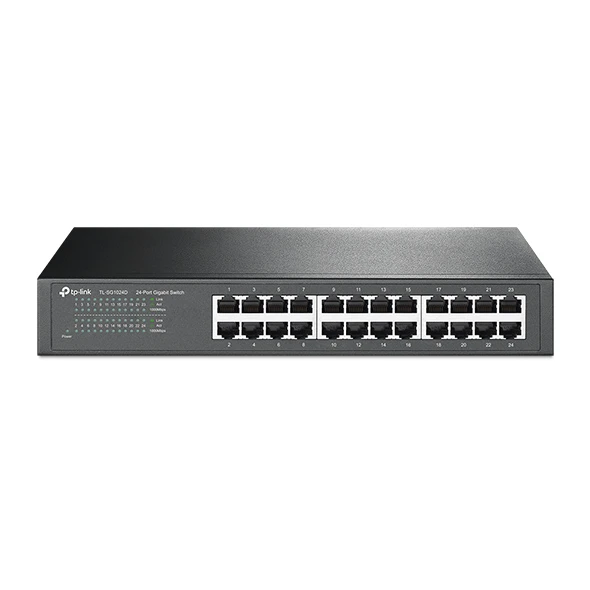
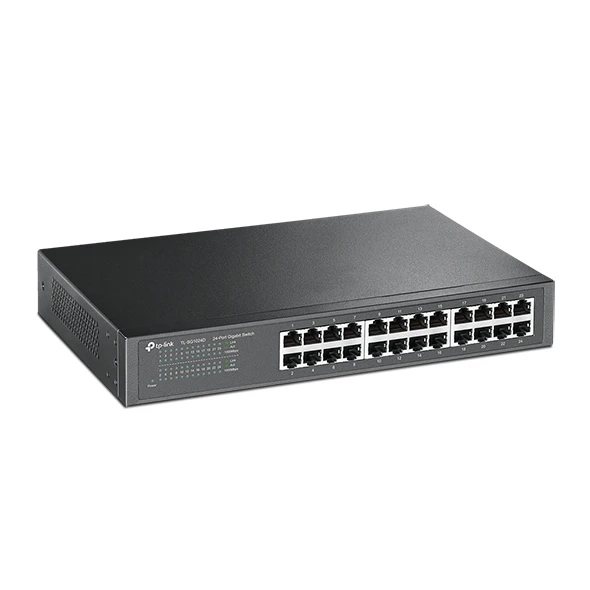
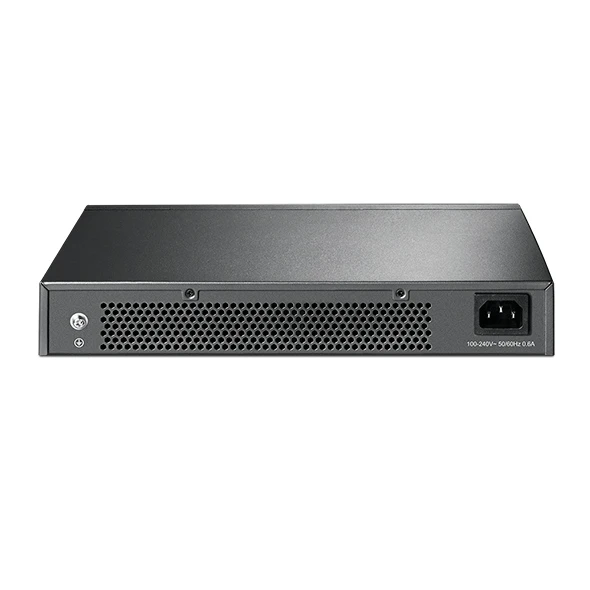
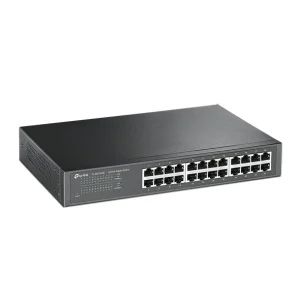
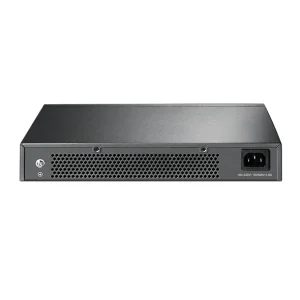
TP-Link TL-SG1024D 24-Port Gigabit Switch
₨18999.00
- 24 Gigabit Ethernet ports for desktops, printers, NAS, cameras and access points
- 48 Gbps switching capacity with 35.7 Mpps forwarding for full-speed wired networking
- Fanless, silent metal design — quiet enough for an office desk or a small rack
- Unmanaged plug-and-play setup with desktop or rackmount fitting included
- Description
- Reviews (0)
Description
Overview
Twenty-four ports is the size most small offices land on — desktops, a printer or two, a NAS box, a few IP cameras and a couple of access points, with a port or two left over. The TP-Link TL-SG1024D is built for exactly that job: a 24-port gigabit switch for a desk or a 19-inch rack, with no configuration and no noise.
Every port runs at 10/100/1000 Mbps, and the switch is non-blocking — a 48 Gbps switching capacity and a 35.7 Mpps forwarding rate mean all 24 ports can run at full gigabit at the same time. Store-and-forward switching checks each frame for errors before passing it on.
Two features set it apart from the cheapest 24-port switches. Isolation Mode, on ports 1 to 22, keeps connected devices from talking directly to each other — useful for guest PCs or cameras that should stay separated. Loop Prevention, on all 24 ports, guards against a cable accidentally plugged back into the same switch, a loop that can bring a whole network to a standstill.
The switch is fanless, so it runs silently, and its metal casing is built to last. There is nothing to configure: plug in the power and the cables, and it works. It pairs naturally with the access points NexGenShop.pk stocks — a TP-Link EAP225-Wall AC1200 Wall-Plate Access Point in a meeting room, for example, gets its full wired connection here.
Key Benefits
The first benefit is enough ports at the right price. Twenty-four gigabit ports cover a small office in one box, and at Rs 18,999 the cost per port is far lower than three 8-port switches with three power sockets. One box, one power cord, one place to check.
The second is speed that does not fade when the office gets busy. The 48 Gbps backplane is non-blocking, so the switch keeps up when backups, file transfers and camera streams run at once. The 8K MAC address table tracks every connected device, and 10 KB jumbo frames help large transfers move faster.
The third is silence. The SG1024D is fanless, with no moving parts to wear out or hum in a quiet room. It can sit on a desk next to someone working without adding noise to the office.
The fourth is flexibility in how you fit it. Rackmount kits and rubber feet are both included, so the same switch works on a desktop today and in a 19-inch rack tomorrow. Auto Negotiation and Auto MDI/MDIX handle each port’s speed and cable type.
Features and Advantages
All 24 RJ45 ports support 10, 100 and 1000 Mbps with Auto Negotiation, and Auto MDI/MDIX removes the need for crossover cables. Plug in any device with a standard cable and the port sorts itself out.
Isolation Mode is the feature most buyers do not expect at this price. On ports 1 to 22, it stops devices from talking to each other directly, while still letting each reach the router or server — useful for guest networks, or cameras that should only talk to the recorder.
Loop Prevention is the other quiet safeguard. If someone plugs both ends of a cable into the switch, or creates a loop through another switch, the SG1024D detects and blocks it before it can flood the network — a feature that can save an entire morning of downtime.
Green Technology cuts power use based on link status and cable length, and maximum power draw is only 13.62 W. IEEE 802.3x flow control keeps large transfers smooth by asking senders to pause briefly when a receiver is busy.
The metal casing protects the switch, helps it run cool without a fan, and survives office knocks better than a plastic box. Front-panel LEDs show power, speed and link/activity for every port, so a dead cable or unplugged device is easy to spot.
Ideal Users
This switch suits small offices with 15 to 24 wired devices — desktops, printers, a NAS, IP cameras and access points — that need one dependable box instead of a tangle of small switches. It also fits schools wiring a computer lab, shops and clinics with a few PCs and a camera system, and homes with a serious wired setup.
It suits buyers who want gigabit speed everywhere but do not need management features. If nobody will log into a switch to configure VLANs, an unmanaged switch gives the same speed with nothing to maintain.
It does not power devices over the cable — the SG1024D is non-PoE — so cameras and access points that need PoE must be powered separately. For wireless coverage, it pairs well with wall-plate and ceiling access points such as the TP-Link EAP235-Wall AC1200 Wall Plate Access Point or the TP-Link EAP225 AC1350 Ceiling Access Point.
Technical Specifications
| Specification | Details |
|---|---|
| Ports | 24 × 10/100/1000 Mbps RJ45 (Auto Negotiation / Auto MDI/MDIX) |
| Switching capacity | 48 Gbps (non-blocking) |
| Packet forwarding rate | 35.7 Mpps |
| Forwarding mode | Store-and-Forward |
| Jumbo frame | 10 KB |
| MAC address table | 8K (8,000 entries) |
| PoE | No — non-PoE |
| Management | Unmanaged — plug & play, no configuration required |
| Advanced features | Isolation Mode (ports 1–22), Loop Prevention (ports 1–24), MAC address self-learning, IEEE 802.3x flow control, Green Technology (energy-efficient) |
| Standards | IEEE 802.3i, 802.3u, 802.3ab, 802.3x |
| Power supply | 100–240 VAC, 50/60 Hz (internal) |
| Max power consumption | 13.62 W (220 V/50 Hz) |
| Max heat dissipation | 46.44 BTU/h |
| Fan | Fanless (silent) |
| Dimensions | 294 × 180 × 44 mm (11.6 × 7.1 × 1.7 in) |
| Form factor / mounting | Desktop or rackmount (rackmount kits included); 19-inch rackmountable |
| Certifications | FCC, CE |
| Operating temperature | 0–40 °C (32–104 °F) |
| Storage temperature | −40–70 °C (−40–158 °F) |
| Operating humidity | 10%–90% non-condensing |
| Storage humidity | 5%–90% non-condensing |
| In the box | Switch, power cord, installation guide, rackmount kits, rubber feet |
FAQs
Is the TL-SG1024D a managed switch?
No. It is unmanaged and plug-and-play — no web interface, nothing to set up.
Does the TL-SG1024D support PoE?
No — it carries data only. Cameras and access points that need power over the cable need a PoE injector or a PoE switch.
What is Isolation Mode, and when would I use it?
On ports 1 to 22, Isolation Mode stops devices from talking directly to each other, while still letting each reach the router or server — useful for guest devices, or cameras that should only talk to the recorder.
What is the difference between the TL-SG1024D, the TL-SG1024 and the TL-SG1024DE?
The TL-SG1024D is the unmanaged desktop/rackmount 24-port gigabit switch. The TL-SG1024 (no “D”) is a different rackmount-only model, the TL-SG1024DE is the Easy Smart managed version, and the TL-SF1024D runs at 10/100 Mbps only. Check the model name on the box.
Will it work with my access points and cameras?
Yes. Any device with an Ethernet port connects like any other wired device — a TP-Link EAP225-Wall AC1200 Wall-Plate Access Point or a TP-Link EAP225 AC1350 Ceiling Access Point plugs into a port.
Why Buy From NexGenShop.pk?
NexGenShop.pk stocks genuine TP-Link networking gear at fair prices, and the TL-SG1024D is listed at Rs 18,999 with delivery across Pakistan — a real product from a real store, with someone to talk to if anything needs sorting after delivery. Building out a small office network? The team can help you pick the right combination. Follow NexGenShop.pk on Facebook and Instagram for new stock and offers.
Final Conclusion
The TP-Link TL-SG1024D is the right size for a small office that has outgrown a desktop switch but does not need managed features. Twenty-four gigabit ports, a non-blocking 48 Gbps backplane, fanless silent running, and two useful safeguards — Isolation Mode and Loop Prevention — make it a solid backbone for desktops, printers, a NAS, cameras and access points. At Rs 18,999, it wires up a whole office in one quiet, dependable box.







Reviews
There are no reviews yet.