

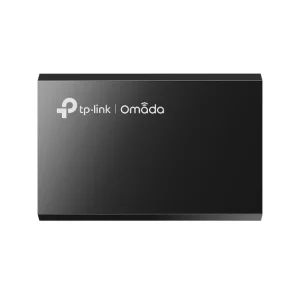
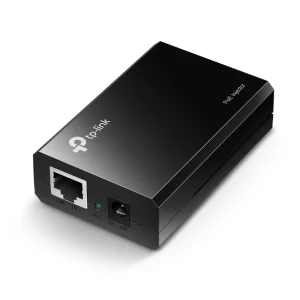
TP-Link POE150S Omada PoE Injector
₨6700.00
- IEEE 802.3af PoE injector delivering up to 15.4 W over a single Ethernet cable
- Gigabit LAN and PoE ports — power and data up to 100 m on one cable
- Plug-and-play with auto-sensing and overload protection, no configuration
- 48 V power adapter and RJ45 cable included in the box
- Description
- Reviews (0)
Description
Overview
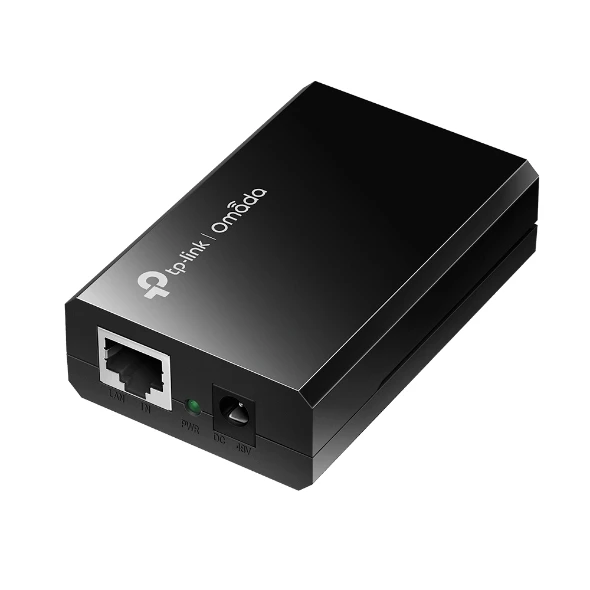
The TP-Link POE150S is a gigabit PoE injector that solves a simple problem: how to power a device over its network cable when the switch it connects to has no PoE. It takes power from its own 48 V adapter and data from an ordinary switch port, combines them onto one Ethernet cable, and delivers both to the device at the other end, up to 100 metres away.
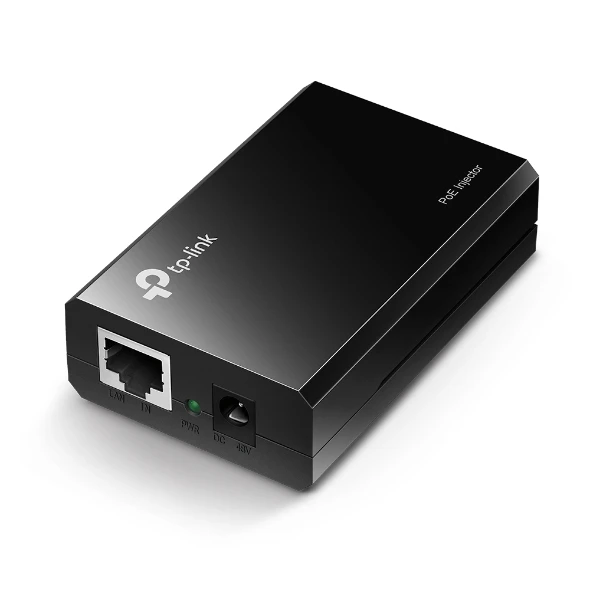
The injector has two Gigabit RJ45 ports. The LAN IN port takes data from the switch, and the PoE POWER+DATA OUT port sends power and data down the cable to the device. Both ports auto-negotiate speed and work with auto MDI/MDIX. There is also a 48 VDC power input port and a green PWR LED that shows the unit has power.
Be exact about what this injector is. It follows IEEE 802.3af, delivering up to 15.4 W — enough for most standard access points, IP cameras and IP phones. It is not 802.3at, so it will not power a device that needs 30 W of PoE+. A high-power device needs a PoE+ injector or a PoE+ switch instead.
Key Benefits
The first benefit is that it saves buying a new switch. A PoE switch costs several times more than this injector, and it only makes sense when there are many PoE devices to power. If the job is one access point on a wall, or one camera over a shop door, a single POE150S does the same job for a fraction of the price.
The second benefit is placement. An access point belongs high on a wall or on a ceiling, and a camera belongs over a door or on a corner — rarely where a power socket is. With the POE150S, the device goes where it works best, and the power travels with the data over the Ethernet cable, up to 100 metres.
The third benefit is safety and simplicity. The injector auto-senses what the device needs and cuts power if the device tries to draw more than 15.4 W, protecting both the injector and the device. And it is genuinely plug-and-play: nothing to configure and nothing to learn.
Features and Advantages
The two Gigabit ports set the POE150S apart from cheaper injectors. Both the LAN IN and the PoE OUT ports run at 10/100/1000 Mbps, so the injector does not become a bottleneck on a gigabit network. Some cheaper injectors are Fast Ethernet only and quietly cap the device at 100 Mbps. This one does not.
Auto-sensing is built in. The injector detects the power requirements of the connected device and supplies what it needs, up to the 15.4 W limit, and it cuts power if the device exceeds that limit. That protects the device from over-current and the injector from overload.
The build is simple and solid. The unit is 80.8 × 54 × 24 mm, runs from 0 °C to 40 °C, and carries FCC, CE and RoHS certifications. It complies with IEEE 802.3i, 802.3u, 802.3ab and 802.3af. In the box, TP-Link includes the injector, the 48 VDC power adapter, an RJ45 cable and the installation guide. Some retailer listings wrongly describe this model as having 10/100 Mbps ports or a 53.5 V adapter — the official specification is Gigabit ports and a 48 VDC adapter.
Ideal Users
The POE150S suits anyone with one or two 802.3af devices and a switch that has no PoE. A home user adding a single access point to cover a dead spot, a shop owner putting a camera over the door, or a small office adding an IP phone to a desk — these are all one-injector jobs.
It also suits installers who keep injectors on the van. When a site has a non-PoE switch and one more access point to add, an injector goes in without touching the rest of the network. It does not suit a job with many PoE devices — four or five cameras would need four or five injectors, and at that point a PoE switch is the right answer. And it does not suit a device that needs PoE+ (802.3at, 30 W) — check the device’s power standard before ordering.
Technical Specifications
| Specification | Details |
|---|---|
| Model | TP-Link POE150S (TL-POE150S) |
| PoE standard | IEEE 802.3af compliant — NOT 802.3at; max 15.4 W only |
| Ports | 2× 10/100/1000 Mbps RJ45 (1× LAN IN + 1× PoE POWER+DATA OUT), auto-negotiation / AUTO MDI/MDIX; plus 1× 48 VDC power input port |
| Distance | Delivers power + data up to 100 m over one cable |
| Power | 15.4 W max (48 VDC) — external 48 VDC power adapter included |
| Auto-sensing | Auto-determines power requirements; overload protection cuts power if PD exceeds 15.4 W |
| Setup | Plug-and-play, no configuration |
| LED | PWR (green) |
| Dimensions | 80.8 × 54 × 24 mm (3.2 × 2.1 × 0.9 in) |
| Operating temperature | 0–40 °C; storage −40 to 70 °C |
| Humidity | Operating 10–90% non-condensing; storage 5–90% |
| Standards | IEEE 802.3i/u/ab/af |
| Certifications | FCC, CE, RoHS |
| Compatibility | All 802.3af-compliant PDs, or TL-POE10R receiver adapters — APs, IP cameras, IP phones |
| In the box | Gigabit PoE Injector TL-POE150S, Power Adapter, RJ45 Cable, Installation Guide |
FAQs
What does a PoE injector do?
It adds power to a network cable. The switch provides the data, the injector’s 48 V adapter provides the power, and both travel on one Ethernet cable to the device, so it needs no power socket of its own.
Will the POE150S power my access point?
If the access point is 802.3af and draws up to 15.4 W, yes. Most standard access points, including the TP-Link EAP225-Wall and TP-Link EAP235-Wall, work with it. A device that needs 802.3at (PoE+, 30 W) needs a PoE+ injector or switch instead.
Do I need to configure anything?
No. Connect the LAN port to the switch, the PoE port to the device cable, and the power adapter to the mains. The injector auto-senses the device’s power needs.
How far can the device be from the injector?
Up to 100 metres over a single Ethernet cable, power and data together. That covers most homes, shops and small offices.
Is the TL-POE150S the same product as the POE150S?
Yes. TP-Link’s newer Omada branding drops the “TL-” prefix — the TL-POE150S and the POE150S are the same injector.
Can I use it with a non-TP-Link device?
Yes, if the device is 802.3af compliant. The standard is the same across brands, so a standard IP camera or IP phone from another maker will work with it.
Why Buy From NexGenShop.pk?
NexGenShop.pk lists the POE150S at Rs 6,700 with the full box contents as TP-Link ships them — the injector, the 48 VDC power adapter, an RJ45 cable and the installation guide. The listing states the official specification, including the 802.3af standard, the 15.4 W limit and the Gigabit ports, so there is no confusion with PoE+ injectors or older Fast Ethernet models. The team can be reached on Facebook and Instagram if you are unsure whether your device is 802.3af or 802.3at. Pair the POE150S with the TP-Link EAP225-Outdoor for an outdoor access point with no socket nearby.
Final Conclusion
The TP-Link POE150S removes a common obstacle: a switch with no PoE and a device that needs power where there is no socket. For Rs 6,700 it adds 802.3af power up to 15.4 W and full Gigabit data over a single cable up to 100 metres, with auto-sensing and overload protection. Order it from NexGenShop.pk and put your device exactly where it belongs.









Reviews
There are no reviews yet.