

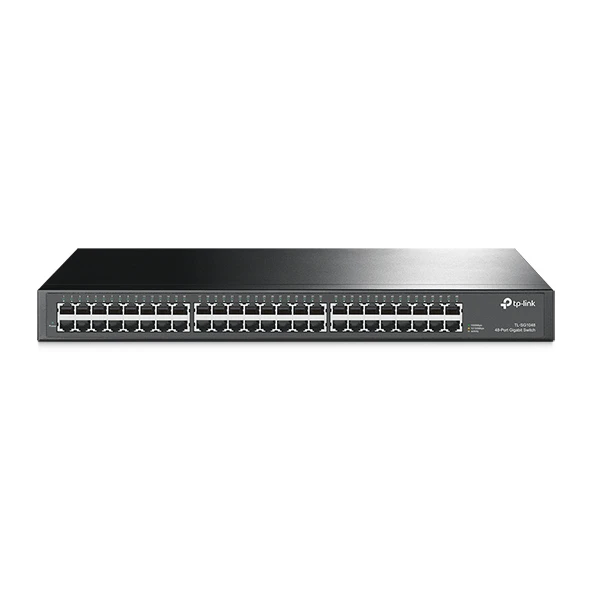
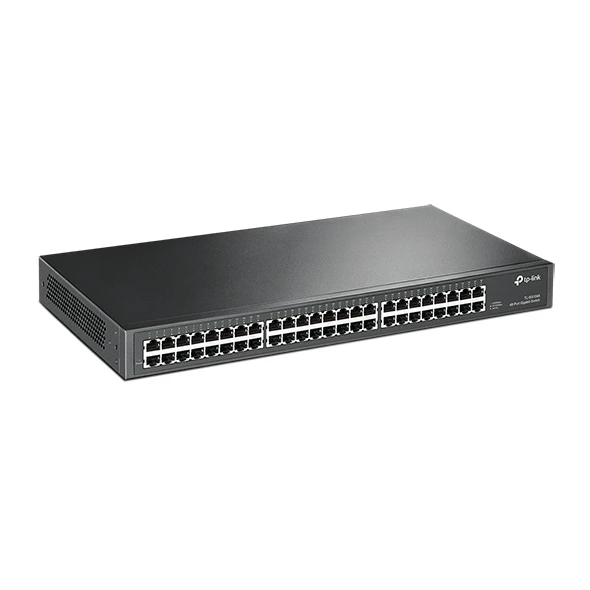
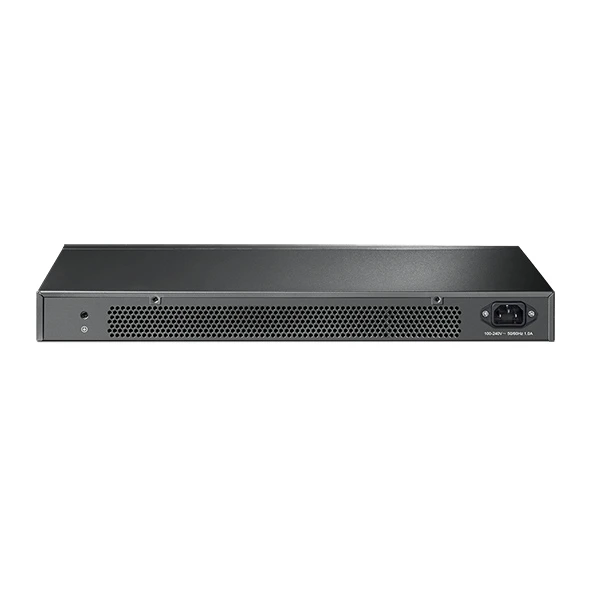
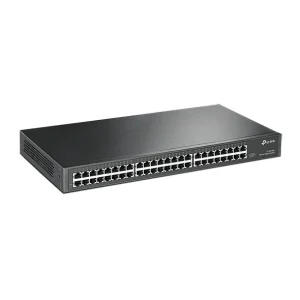
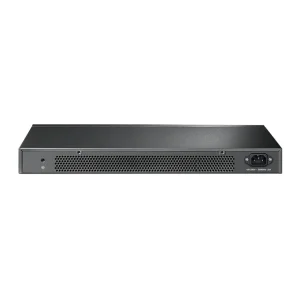
TP-Link TL-SG1048 48-Port Gigabit Switch
₨59999.00
- 48 Gigabit Ethernet ports for PCs, printers, cameras and access points in one rackmount switch
- 96 Gbps switching capacity with 71.4 Mpps forwarding for smooth, wire-speed traffic
- Unmanaged plug-and-play setup — no configuration needed, just connect and go
- Sturdy steel 1U rackmount case with rackmount kit and rubber feet included
- Description
- Reviews (0)
Description
Overview
A network grows one device at a time — a new desktop, a printer, a couple of IP cameras, then access points in every meeting room — until the little switch under the reception desk is full. The TP-Link TL-SG1048 is the straightforward answer: a 48-port gigabit switch in a standard 1U rackmount steel case, built to give a whole office, school or hotel floor a fast wired backbone through one box.
All 48 ports are 10/100/1000 Mbps RJ45, and the switch is genuinely non-blocking. Its 96 Gbps switching capacity and 71.4 million packets per second forwarding rate mean every port can run at full gigabit at the same time. Store-and-forward switching checks each packet for errors before forwarding it, keeping damaged frames off the network.
A 16K MAC address table tracks every connected device, 12 KB jumbo frames move large transfers more efficiently, and a 12 Mb packet buffer absorbs short bursts when several people hit the server at once. There is nothing to install or configure — the TL-SG1048 is unmanaged and plug-and-play. It also suits the wireless side of a network: plug a TP-Link EAP225 AC1350 Ceiling Access Point into any port and the same switch that feeds the desktops feeds the Wi-Fi too.
Key Benefits
The first benefit is room to grow. Forty-eight gigabit ports in one 1U unit wire up dozens of desktops, printers, cameras and access points — no stacking three small switches and three power adapters on a shelf. One box, one power cord, one place to look when something needs checking.
The second is speed that holds up under load. The 96 Gbps non-blocking backplane means backups, file copies and camera streams can run together without the network feeling crowded.
The third is how little it asks of the installer. There is no interface to learn and nothing to configure. Auto Negotiation sorts out the speed of each device, and Auto MDI/MDIX means any standard Ethernet cable works — no crossover cable needed.
The fourth is running cost. Maximum power consumption is only 28.21 W, and the internal 100–240 VAC power supply works from a standard mains socket. It earns its place in a rack and then mostly gets forgotten, which is how a backbone switch should behave.
Features and Advantages
Every port supports Auto Negotiation and Auto MDI/MDIX, so each connection automatically runs at the best speed the device supports — 10, 100 or 1000 Mbps — with the correct cable type. That removes the small mistakes behind most “the network is slow” complaints.
Store-and-forward switching checks each frame for errors before forwarding it, so damaged frames are dropped at the switch instead of travelling across the network and wasting bandwidth.
Flow control follows IEEE 802.3x on full-duplex links, with backpressure on half-duplex links. When a receiving device is busy, the switch asks the sender to pause briefly instead of dropping packets — fewer retransmissions, steadier throughput on large transfers.
The 16K MAC address table is sized for networks where dozens of devices come and go, and the 12 Mb buffer handles normal traffic bursts.
The steel case is a standard 19-inch, 1U unit at 440 × 220 × 44 mm, and the rackmount kit is in the box. Rubber feet are included too, so it can sit on a shelf or desktop if there is no rack yet. Front-panel LEDs show Power, Speed and Link/Activity for every port, so it is quick to see which port is live and which cable needs checking.
Ideal Users
This switch suits offices with 30 to 50 wired devices — desktops, printers, a file server, IP cameras and access points — where a 24-port switch has run out of ports. It also fits schools wiring computer labs, hotels putting a wired point in back-office rooms, and CCTV and server rooms where many cameras and recorders need reliable gigabit connections.
It suits buyers who want a wired backbone without a managed switch. If the network does not need VLANs, remote management or PoE, this switch gives all the ports and speed at a lower price, with nothing to maintain.
It is not the right switch for powering devices over the cable — the TL-SG1048 is non-PoE, so cameras and access points that need PoE must be powered separately, for example with a PoE injector. For wireless coverage, its ports pair well with access points such as the TP-Link EAP723 BE5000 Ceiling Mount WiFi 7 Access Point or the TP-Link EAP225-Outdoor AC1200 Gigabit Outdoor Access Point for outdoor areas.
Technical Specifications
| Specification | Details |
|---|---|
| Ports | 48 × 10/100/1000 Mbps RJ45 (Auto Negotiation, Auto MDI/MDIX) |
| Switching capacity | 96 Gbps (non-blocking, wire-speed) |
| Packet forwarding rate | 71.4 Mpps |
| Forwarding mode | Store-and-Forward |
| MAC address table | 16K |
| Jumbo frame | 12 KB |
| Buffer memory | 12 Mb |
| PoE | No — non-PoE |
| Management | Unmanaged — plug and play, no configuration |
| Standards | IEEE 802.3i, 802.3u, 802.3ab, 802.3x (flow control full-duplex; backpressure half-duplex) |
| Power supply | 100–240 VAC, 50/60 Hz (internal) |
| Max power consumption | 28.21 W (220 V/50 Hz) |
| Max heat dissipation | 96.20 BTU/h |
| Case / form factor | Steel case, standard 19-inch rackmount, 1U |
| Dimensions | 440 × 220 × 44 mm (17.3 × 8.7 × 1.73 in) |
| Mounting | Rackmount (kits included); also desktop-usable (rubber feet included) |
| LEDs | Power, Speed, Link/Activity |
| Operating temperature | 0–40 °C |
| Operating humidity | 10%–90% RH, non-condensing |
| Storage temperature | −40–70 °C |
| Storage humidity | 5%–90% RH, non-condensing |
| Certifications | CE, FCC |
| In the box | Switch, power cord, installation guide, rackmount kits, rubber feet |
FAQs
Is the TL-SG1048 a managed switch?
No. It is unmanaged — no web interface, no configuration. Plug in the power and the cables, and it starts switching right away.
Does the TL-SG1048 support PoE?
No — it carries data only. Cameras or access points that need power over the cable need a PoE switch or a separate PoE injector.
Can I use it on a desktop instead of in a rack?
Yes. Rubber feet are included, so it can sit on a desk or shelf, and the rackmount kit is included too, so you can move it into a 19-inch rack later.
What is the difference between the TL-SG1048 and the TL-SF1048?
The TL-SG1048 is gigabit — all 48 ports run at up to 1000 Mbps. The TL-SF1048 is a much older, slower model with 10/100 Mbps ports only. Check the box says SG1048 if you need gigabit speed.
Will it work with my Wi-Fi access points?
Yes. Any access point with an Ethernet port plugs in like any other wired device — for example a TP-Link EAP225 AC1350 Ceiling Access Point or a TP-Link EAP723 BE5000 Ceiling Mount WiFi 7 Access Point.
Why Buy From NexGenShop.pk?
NexGenShop.pk stocks genuine TP-Link networking gear at fair prices, and the TL-SG1048 is listed at Rs 59,999 with delivery across Pakistan — a real product from a real store, not a grey-market listing with no one to call afterwards. Planning a larger setup? The team can help you pick the right combination of switches and access points before you buy. Follow NexGenShop.pk on Facebook and Instagram for new stock and offers.
Final Conclusion
The TP-Link TL-SG1048 does one job and does it well: 48 fast, reliable gigabit ports in a single rackmount box, with no configuration and no fuss. Its 96 Gbps switching capacity, store-and-forward design and 16K MAC table are sized for real office traffic, and its low power draw and steel 1U case suit a rack meant to run for years. If your network has outgrown a small desktop switch, this is the sensible next step — order it from NexGenShop.pk for Rs 59,999.



Reviews
There are no reviews yet.