

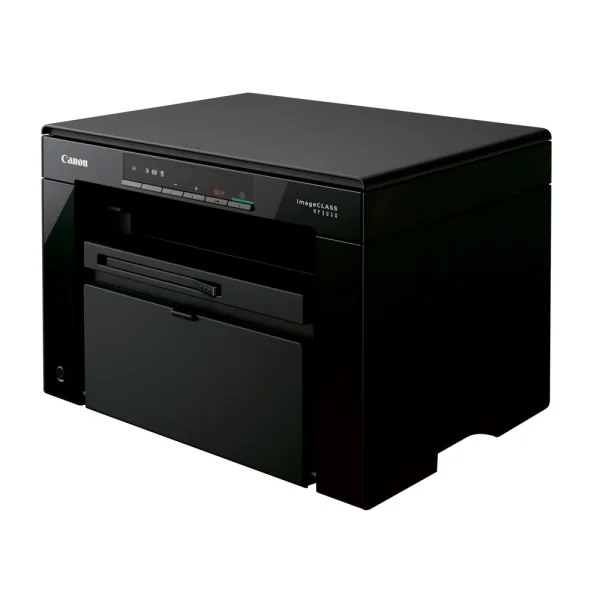
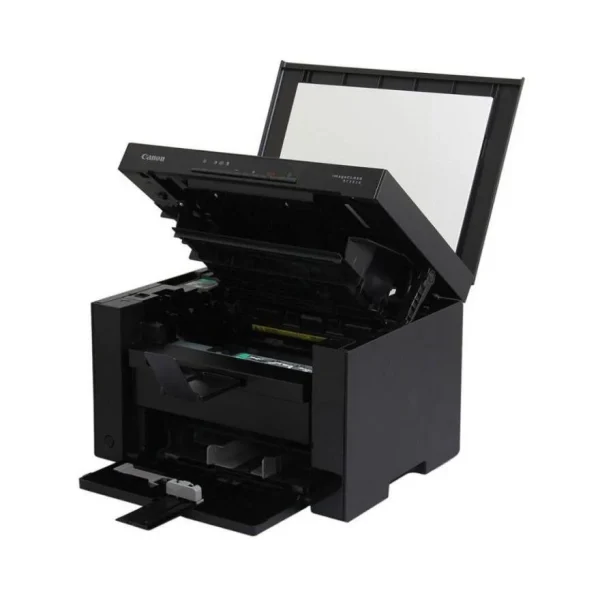
Canon imageCLASS MF3010 Laser Printer
₨52999.00
- Mono laser print, scan and copy in one compact unit at up to 18 ppm
- Fast first page in about 7.8 seconds, with 600 × 600 dpi print quality
- One all-in-one Cartridge 325 (drum + toner) with a 1,600-page yield
- 150-sheet cassette and colour flatbed scanner, in a 372 × 276 mm footprint
- Description
- Reviews (0)
Description
Overview
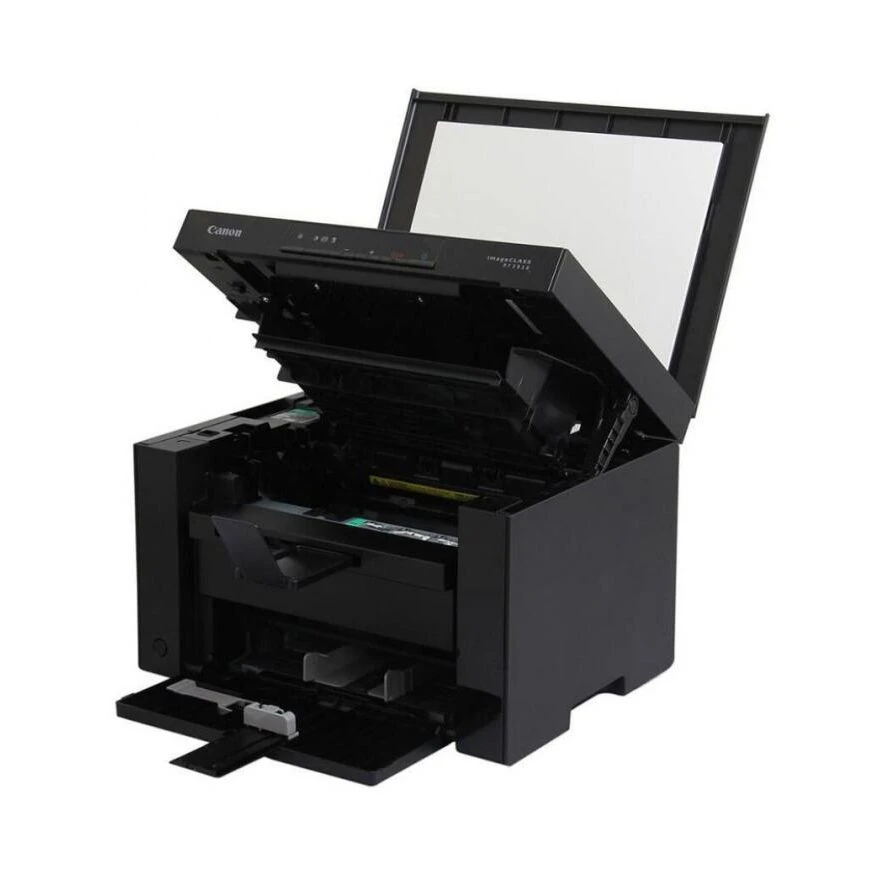
The Canon imageCLASS MF3010 is a small mono laser multifunction printer — it prints, scans and copies in black and white, all in one box that fits on a desk. It prints at up to 18 pages a minute on A4, with the first page out in about 7.8 seconds, so short jobs finish before you have walked back from the kettle. The print resolution is up to 600 × 600 dpi, with 1,200 dpi equivalent available, which keeps text sharp and readable.
One fact about this printer matters more than any other, so it goes here plainly: it connects by Hi-Speed USB 2.0 only. There is no Wi-Fi and no Ethernet port, so it prints from the computer it is plugged into — it is not a shared network printer. For a home office or a single desk, that is usually all that is needed, and it keeps the price and the setup simple.
The scanner is a colour flatbed CIS unit, so even though printing is black and white only, scans come out in colour at up to 600 × 600 dpi optical. The 150-sheet cassette and the 100-sheet output tray mean it is ready for a morning’s worth of forms and assignments without constant refilling.
Key Benefits
Three functions in one small box. Printing, colour scanning and copying cover the everyday needs of a home office without three separate devices, three power cables and three places on the desk. At 372 × 276 mm, the MF3010 fits where a bigger multifunction will not.
Speed where it counts. Eighteen pages a minute and a first page in about 7.8 seconds mean a two-page letter or a five-page form is done in moments, and the 10-second warm-up from power-on means the printer is ready almost as soon as it is switched on.
Simple cartridge changes. The Canon Cartridge 325 is an all-in-one unit — drum and toner in a single cartridge — so changing it is a one-step job with nothing to clean and no separate drum to replace. The standard cartridge is rated at 1,600 pages, which keeps running costs predictable.
Laser quality without the inkjet hassle. Text comes out sharp and smudge-free, and there is no ink to dry out during a quiet month. For anyone who prints in bursts — assignments, forms, invoices — that reliability is the real benefit.
Features and Advantages
Printing is mono laser at up to 600 × 600 dpi, with 1,200 dpi equivalent × 600 dpi available, and it handles A4 at 18 ppm and Letter at 19 ppm. The 64 MB of shared memory keeps short jobs moving, and the maximum power draw of 960 W drops to 450 W in operation, 2.5 W on standby and about 1.4 W in sleep.
Copying runs at up to 18 copies a minute on A4, with 2-on-1 copying, ID Card Copy and a zoom range of 50–200%, so a shop can copy both sides of an ID onto one page and a student can shrink a handout to fit. Copy resolution is 600 × 400 dpi on speed priority and 600 × 600 dpi on resolution priority.
The flatbed colour scanner reads at up to 600 × 600 dpi optical, driver-enhanced to 9,600 × 9,600 dpi, so old photos and documents scan in colour even though the printer itself is mono. Paper handling is a 150-sheet cassette (60–163 g/m²) with a 100-sheet face-down output, and the recommended monthly volume is 250–1,000 pages, with a maximum duty cycle of 8,000 pages. For a small office that also needs Wi-Fi in the same room, the TP-Link EAP225-Wall covers it.
Ideal Users
Home offices and students will get the most out of the MF3010. Assignments, forms and black-and-white documents print quickly and cheaply, and the colour scanner handles the occasional photo or certificate without a second device.
Small shops and clinics are the second group: occasional printing, scanning and copying in one device, on a counter or a shelf, with no network setup to worry about. A clinic printing prescriptions and scanning IDs all day will find the 150-sheet cassette and the ID Card Copy feature genuinely useful.
It also suits anyone replacing an inkjet. Toner never dries out, text stays sharp, and the running cost is a known quantity — one Cartridge 325, 1,600 pages. A small office running the MF3010 alongside a few PCs will want a solid network behind it, and the TP-Link ER605 Omada Gigabit VPN Router is the gateway for that setup.
Technical Specifications
| Specification | Details |
| Functions | Print, Scan, Copy (mono laser) |
| Print speed | Up to 18 ppm (A4); up to 19 ppm (LTR) |
| Print resolution | Up to 600 × 600 dpi; 1,200 dpi (equivalent) × 600 dpi |
| First print out time | Approx. 7.8 sec (A4) |
| Copy speed | Up to 18 cpm (A4) / 19 cpm (LTR) |
| Copy resolution | 600 × 400 dpi (speed priority); 600 × 600 dpi (resolution priority) |
| Scan type | Flatbed colour CIS scanner |
| Scan resolution | Optical up to 600 × 600 dpi; driver-enhanced up to 9,600 × 9,600 dpi |
| Paper source | 150-sheet cassette |
| Paper output | 100 sheets (face down) |
| Paper weight | 60–163 g/m² (cassette) |
| Toner cartridge | Cartridge 325 — 1,600 pages (ISO/IEC 19752); bundled starter cartridge 700 pages |
| Connectivity | Hi-Speed USB 2.0 ONLY — no Wi-Fi, no Ethernet |
| Memory | 64 MB (shared) |
| Warm-up time | 10 sec or less from power-on |
| Dimensions | 372 × 276 × 254 mm (cassette closed); 372 × 371 × 254 mm (cassette open) |
| Weight | 8.2 kg (with cartridge); 7.6 kg (without) |
| Power consumption | Max 960 W; operating 450 W; standby 2.5 W; sleep approx. 1.4 W |
| Monthly duty cycle | 8,000 pages max; recommended 250–1,000 pages/month |
| Copy features | 2-on-1, ID Card Copy; zoom 50–200% |
FAQs
Does the MF3010 have Wi-Fi? No — it connects by USB cable only. It has no Wi-Fi and no Ethernet port, so it prints from the computer it is plugged into.
Which toner cartridge does it use? Canon Cartridge 325, rated at 1,600 pages. The cartridge supplied in the box is a 700-page starter.
Can it scan in colour? Yes — the flatbed scanner is a colour CIS scanner (optical 600 × 600 dpi), even though printing is black-and-white only.
How much paper does it hold? A 150-sheet cassette, with a 100-sheet face-down output.
Is it good for heavy daily printing? Canon recommends 250–1,000 pages a month; the maximum duty cycle is 8,000 pages a month.
Why Buy From NexGenShop.pk?
NexGenShop.pk lists the Canon imageCLASS MF3010 at Rs 52,999 with delivery across Pakistan. The listing states the official Canon Asia specifications — including the USB-only connection, so there are no surprises — and the team can help before you buy if you are unsure whether a mono laser fits your work. Pair it with the TP-Link EAP655-Wall for Wi-Fi 6 coverage across the office. For new stock and offers, follow NexGenShop.pk on Facebook and Instagram.
Final Conclusion
The Canon imageCLASS MF3010 is a compact, honest mono laser multifunction: 18 ppm printing, colour scanning and copying in one small box, with a simple all-in-one cartridge and no ink to dry out. Its one clear limit is the USB-only connection — for a single desk or a home office, that is no limit at all. At Rs 52,999, it is a practical printer for homes and small offices in Pakistan.



Reviews
There are no reviews yet.